Use this to set the colors you want for each puzzle! We have written the standard colors for
each side, but feel free to change them however you like. NB! For 2x2-7x7, we also have weak
colors defined, which is used in some trainers.
General Settings
3
Blind Settings
Click any non-center sticker to set its target character. On desktop, click the sticker and
press a key. On touch devices, tap the sticker and enter a single character. Corner targets
must stay unique among corners, and edge targets must stay unique among edges. The priority
lists are used for permutation cycle breaks only, in the order you write them.
Earlier entries win when a permutation cycle break is needed.
You're shown the top side of a 3x3 cube. One sticker will light up, and a move
sequence will be given. Your goal is to identify where this sticker ends up. To mark a
sticker, hold down on the top side sticker and drag to the correct side (or click to mark
the top sticker).
Instructions
The 2D cube face in the trainer represents the top layer of a 3x3 cube.
Once you press "Start", a sticker will turn yellow and you'll be presented
with a sequence of moves. Determine the final position of the yellow sticker
after the sequence.
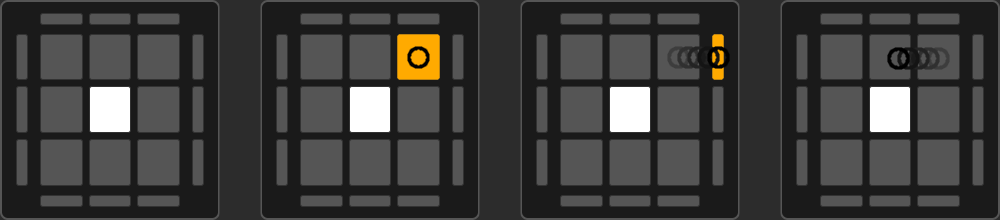
To select a sticker: press down your mouse/finger on the top sticker and drag
to the side to choose orientation. Drag away to cancel. Clicking selects the top sticker.
NB: The move sequence might temporarily move the sticker out of the top
layer, but the sequence will always end with the yellow sticker in the top layer.
Settings
Type: Choose between tracking corners or edges
Moves: Set sequence length (1-20 moves)
Move Sticker Every Turn: Toggle to force the highlighted piece to move
on
every move of the sequence.
How to Use
Click "Start": Begin the tracking game
Track the displayed sticker: Note the yellow-highlighted piece and
follow it through the move sequence
Mark where it ends up: Press down on the top sticker and drag your
finger to the correct side (or click if it stays on top)
Get feedback: Green for correct, orange for correct position but wrong
orientation, red for incorrect
Repeat: New case automatically generates from the correct answer
position
Tips
Start with shorter sequences and gradually increase difficulty
Practice both corners and edges separately before mixing
Visualize cube rotations in your head rather than tracing with your finger
Longer sequences improve your ability to track complex piece movement patterns
Trigger Parentheses Settings
Drag to reorder. Invalid triggers are marked red.
Alg Names Settings
Drag to reorder. Duplicate algorithms are marked in yellow. Each entry maps an algorithm to
a short name.